
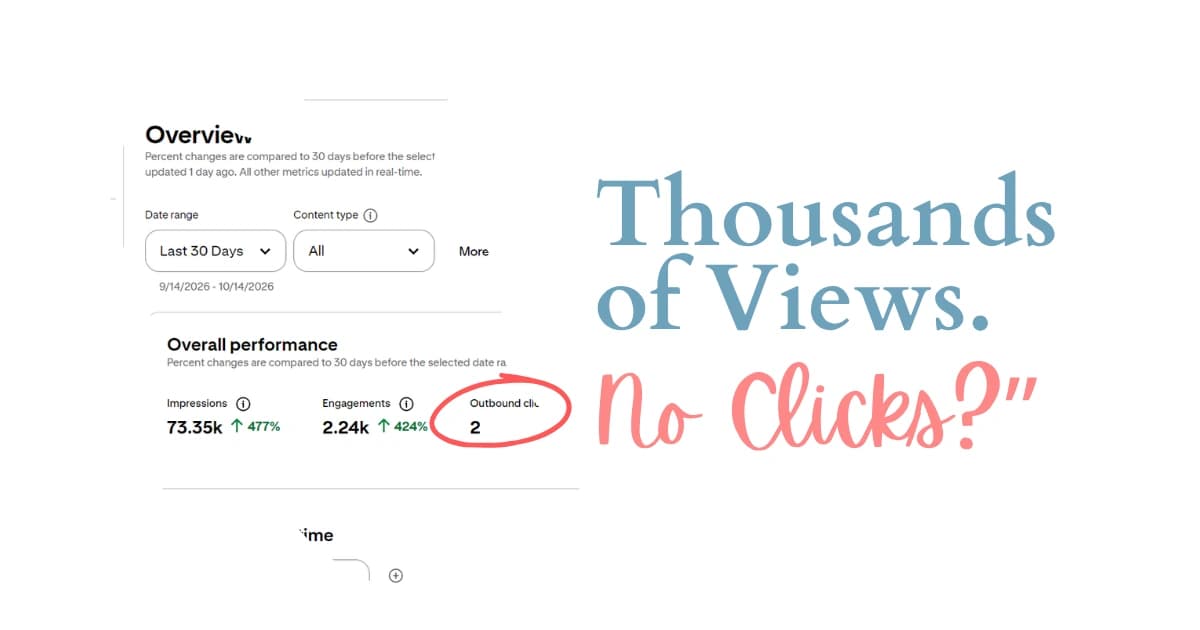
Are your Pinterest impressions going up, but your outbound clicks are barely moving?
You open your Pinterest analytics and see thousands of impressions, maybe even hundreds of thousands. Your pins are getting shown, your graphs look promising, but when you check your website traffic, there’s barely anything to celebrate.
Frustrating, right?
I’ve seen this pattern enough to know that the problem isn’t necessarily Pinterest, and it doesn’t automatically mean you’re doing something wrong.
Pinterest impressions and outbound clicks measure two completely different things. You can get your pins in front of thousands of people without giving them a good enough reason to visit your website.
And if your goal is to drive traffic to your blog, impressions alone won’t get you there.
The good news? You don’t necessarily need more impressions. You need to understand why people aren’t clicking and fix the gap between what your pin shows and what your audience actually wants.
In this guide, I’ll walk you through the three things I focus on when Pinterest impressions aren’t turning into clicks: creating pins that give people a reason to visit your website, using the right keywords, and making sure your content delivers on the promise.
Why Am I Getting Pinterest Impressions But No Clicks?
If you’re getting Pinterest impressions but no clicks, the first thing I’d look at is your pin’s promise.
Think about it. Someone is scrolling through Pinterest, sees your pin, and keeps scrolling. Your impression count increases, but that person never visits your website.
Why?
Maybe your pin doesn’t tell them what they’ll get by clicking. Maybe your title and description are too vague to connect with what they’re searching for. Or maybe your pin already gives them everything they need, so there’s no reason to leave Pinterest.
These are three different problems, but they lead to the same result: impressions without meaningful website traffic.
Here’s what I want you to understand: getting your pin seen is not the same as convincing someone to click it.
Pinterest can show your content to a lot of people, but if those people aren’t looking for what you’re offering, or your pin doesn’t communicate its value, those impressions might not translate into outbound clicks.
So before you spend more time creating pins or trying to increase your reach, take a closer look at what your existing pins are actually offering.
That’s where I’d start.
Pinterest Impressions vs. Outbound Clicks: What’s the Difference?
Before fixing your Pinterest strategy, you need to understand what your analytics are telling you.
What are Pinterest impressions?
A Pinterest impression means your pin appeared on someone’s screen.
That’s it.
It doesn’t necessarily mean the person stopped scrolling, read your title, understood your content, or wanted to visit your website.
Pinterest is an endless feed of visual content. Someone can scroll past your pin in a second, and that still counts as an impression.
This is why impressions can increase while your website traffic stays exactly where it is.
Your pin is being shown, but that doesn’t automatically mean it’s attracting people who want to click.
What are Pinterest outbound clicks?
Outbound clicks are the clicks that take people from Pinterest to your linked website or destination.
If your goal is to grow your blog traffic, this is the metric you need to pay attention to.
A person might see your pin and keep scrolling. They might save it because they like the image. Or they might click because they have a problem and want the answer on your website.
These actions tell you different things about how your content is performing.
Here’s how I look at it:
| Pinterest metric | What it tells you |
| Impressions | Your pin is being shown to people. |
| Saves | Your pin is appealing enough for someone to save it. |
| Outbound clicks | Someone is taking action to visit your linked content. |
All three metrics can help you understand your pins, but they don’t serve the same purpose.
If your goal is website traffic, don’t let a growing impressions graph distract you from the number that actually measures those visits.
The Two Types of Pinterest Pins You Need to Understand
One of the biggest mistakes I see people make is treating every Pinterest pin as if it should generate website traffic.
But not every pin gives people a reason to click.
I like to think of Pinterest content in two categories: content that finishes the experience on Pinterest and content that requires someone to visit your website to get the full answer.
Understanding this difference can completely change how you plan your content.
1. Pins that finish the experience on Pinterest
Think about quotes, wallpapers, cute animal photos, and aesthetic images.
Someone sees the content, enjoys it, and continues scrolling. They might save the pin, but they don’t necessarily need to click through to your website because they’ve already received what they came for.
For example, if your pin contains a beautiful quote, the reader can enjoy that quote without visiting your blog.
The same applies to a photo of a beautiful kitchen with no additional information or promise attached to it.
There’s nothing inherently wrong with these types of pins. They can still attract impressions and saves.
However, if your main goal is to generate blog traffic, you shouldn’t build your entire Pinterest content strategy around content that doesn’t give people a reason to leave the platform.
A pin can perform well on Pinterest without doing much for your website.
And that’s an important distinction.
2. Pins that create a reason to click
Now, let’s look at the type of content I would focus on when outbound clicks are the goal.
These pins address a specific problem, answer a question, or promise information that the reader needs to visit your website to get.
For example:
- How to get a stain out of a carpet.
- What to feed a toddler who refuses everything.
- How to stop cat urine smells from coming back.
- How to solve a specific cleaning problem.
Notice what these examples have in common.
They aren’t simply showing something pretty. They’re communicating a problem the reader wants to solve.
The pin introduces the solution, but the actual steps, instructions, or complete answer live on the linked page.
That’s what creates a reason to click.
In one of my accounts, a cleaning board generated more than 7,000 outbound clicks in 21 days. The content wasn’t particularly pretty or complicated. It focused on specific problems and gave people a reason to visit the linked content.
The lesson? Your pin doesn’t need to give everyone a beautiful browsing experience. It needs to give the right person a reason to take action.
If you’re struggling with Pinterest impressions but no clicks, this is the first distinction I’d make in your content strategy.
3 Ways to Turn Pinterest Impressions Into Clicks
Now that you understand why some pins get impressions without generating traffic, let’s talk about how to fix it.
When I’m looking at Pinterest pins that get shown but don’t generate enough outbound clicks, I focus on three things:
- Pinterest pin titles and descriptions.
- The promise communicated by the pin image.
- The experience people get after clicking through to the website.
Let’s break each one down.
1. Optimize Your Pinterest Pin Titles and Descriptions
This is the first thing I’d check if your Pinterest impressions are high but your outbound clicks are low.
You might have a pin that gets plenty of impressions, but if the title and description are vague, Pinterest can show it to people who aren’t necessarily interested in clicking through to your content.
Why does this happen?
Pinterest uses information from your image, title, description, and linked page to understand what your pin is about. It also associates pins with phrases called annotated interests.
When your content uses vague language, Pinterest has less specific information to work with. Your pin might still get visibility, but those impressions don’t necessarily come from people actively searching for the solution you’re offering.
And there’s a big difference between someone browsing Pinterest and someone searching for a specific answer.
Browse traffic is people looking. Search traffic is people looking for something.
If someone is simply browsing, they might enjoy your pin and keep scrolling. But if someone is searching for a specific solution and your pin matches what they need, there’s a much clearer reason for them to click.
So, how do you improve this?
Step 1: Look at pins already ranking for your keyword
Instead of guessing what language to use, start by examining pins that are already ranking for the keyword you’re targeting.
Open the pins in Pinterest search and look at the interests associated with them.
Pay attention to the phrases that describe their content and the language that connects those pins to the search.
You’re looking for clues about how Pinterest understands the content and which phrases are relevant to your topic.
Step 2: Use that language in your own title and description
Once you’ve identified relevant phrases, incorporate them into your pin title and description.
But don’t just stuff keywords into your text.
Write naturally, using language that makes sense to a human reader while clearly explaining what your content offers.
For example, if your content explains how to remove a carpet stain, your title and description should communicate that specific problem and the solution the reader can expect to find.
Avoid vague wording that doesn’t tell Pinterest or the reader what the pin is about.
The goal is to make the topic clear.
Step 3: Make sure the keywords match your content
Your pin title, description, image, and linked page should all communicate the same topic.
If your pin is about removing carpet stains, the linked page should actually explain how to remove carpet stains.
This helps keep your content focused instead of sending mixed signals about what the pin offers.
Remember, the goal isn’t to trick Pinterest into showing your pin to more people.
It’s to help Pinterest understand your content so it can reach people looking for that information.
When your keywords match a real search and your pin communicates a relevant solution, the impressions you receive have a much clearer connection to what your audience wants.
And that’s what makes those impressions more valuable.
2. Make Your Pin Image Impossible to Misunderstand
Your keywords might be perfectly optimized, but that won’t help much if someone sees your pin and has no idea why they should click it.
Your image needs to communicate the promise immediately.
When people scroll through Pinterest, they have plenty of other pins competing for their attention. If your pin doesn’t make its value clear, they can simply move on to another one that does.
That’s why I want you to focus on the text you put directly on your pin image.
Put the promise on the image itself
Aim for four to seven words that tell the reader what they’ll get by clicking.
Not a clever slogan.
Not a vague phrase.
Not a brand message that sounds good but doesn’t explain anything.
A clear promise.
For example:
- Burnt-On Grease Gone in 10 Minutes
- Cat Urine Smell Fixed for Good
These examples communicate a specific outcome. Someone dealing with that problem can immediately understand what the pin is offering.
Compare that with an image that simply says “Cleaning Tips.”
The second example is much less specific. It doesn’t tell the reader which problem the content solves or what they can expect to learn.
The more clearly your pin communicates its purpose, the easier it is for the right person to recognize its relevance.
Don’t make people guess what your pin is about
Here’s the mistake I’d avoid: creating a beautiful image and expecting the reader to figure out the value for themselves.
If someone has to click just to understand what the pin is about, many won’t bother.
They can keep scrolling until they find another pin that already explains what it offers.
Your pin should make the topic and the promised outcome clear before someone clicks.
That doesn’t mean you need to reveal every step or give away the entire article on the image.
It means giving people enough information to understand why the linked content is worth their time.
The pin creates the interest. Your blog post delivers the answer.
That’s the relationship you want to build between your Pinterest image and your website.
3. Make Sure Your Blog Post Delivers on the Promise
This is the third fix, and it’s just as important as the other two.
You can have relevant keywords, a clear title, and an image that gives people a strong reason to click. But what happens when they reach your website?
If the page doesn’t deliver what the pin promised, you’ve created a disappointing experience.
Imagine someone clicks a pin promising a 10-minute dinner recipe.
They expect to find the recipe, but instead, the page opens with 400 words about your holiday.
That’s not what they came for.
They wanted the recipe, and now they have to search for it.
The same problem happens when someone clicks a pin promising a specific cleaning solution but lands on a page that takes too long to get to the actual instructions.
The reader might simply leave.
And if your visitors click through but don’t get what they expected, you’re not building the kind of traffic experience you want.
Give readers what they came for immediately
When someone clicks your Pinterest pin, the promised content should be easy to find on the first screen of your page.
Depending on the topic, that might be:
- The recipe.
- The step-by-step instructions.
- The chart.
- The answer to the question.
- The solution to the problem.
Put the information people came for where they can find it quickly.
Everything else can live underneath it.
You can still include your introduction, personal experience, additional explanations, and other useful details. The important thing is that readers shouldn’t have to work their way through unrelated content before reaching the information your pin promised.
Keep the pin and blog post aligned
Before publishing a pin, ask yourself three questions:
- Does the pin clearly explain what the reader will get?
- Does the linked page deliver exactly what the pin promises?
- Can the reader find that information immediately?
If the answer to any of these questions is no, that’s where I’d start making changes.
The goal isn’t simply to get someone to click. It’s to make sure the click leads to the experience they expected.
Otherwise, you might generate an outbound click without giving the reader a good reason to stay.
How to Analyze Your Pinterest Analytics
Now let’s talk about how to read your Pinterest analytics without getting distracted by the wrong numbers.
When your impressions are climbing, it’s tempting to assume your strategy is working.
And your pins might genuinely be getting more visibility. But visibility and website traffic are two different outcomes.
Here’s how I interpret the three main metrics.
Impressions: Is Pinterest showing your pins?
Impressions tell you that your pins are appearing on people’s screens.
If your impressions are increasing, Pinterest is showing your content.
But that number alone doesn’t tell you whether people are interested in the linked page.
A pin can accumulate impressions simply because people scroll past it.
So, don’t use impressions as your only measure of success when your goal is website traffic.
Saves: Is your pin worth saving?
Saves tell you that someone found your pin appealing or useful enough to save.
This can help you understand how people respond to the content you’re sharing.
However, a save doesn’t automatically mean someone wants to visit your website.
A person might save an aesthetic image, a quote, or another piece of content because they like it, without needing anything from the linked page.
That’s why I wouldn’t treat saves as a substitute for outbound clicks.
Outbound clicks: Are people visiting your website?
This is the metric I’d focus on when my goal is to grow blog traffic through Pinterest.
Outbound clicks indicate that someone took action to visit your linked content.
If impressions are increasing but outbound clicks aren’t, it’s time to look beyond your reach and examine the relationship between your pin, your keywords, and your blog post.
Your content might be getting shown without giving people a compelling reason to click.
Here’s the simple way to remember it:
Impressions tell you about visibility. Saves tell you about saving behavior. Outbound clicks tell you about traffic.
Once you understand what each metric measures, your analytics become much more useful.
Instead of celebrating a big impressions number and hoping the traffic will follow, you can identify what needs attention.
What to Do If Your Pinterest Impressions Are High but Clicks Are Low
Let’s turn everything we’ve covered into a practical action plan.
If your Pinterest impressions are high but your outbound clicks are barely moving, you don’t need to start over or immediately create more pins.
I’d begin with your existing content.
Here’s the exact process I’d follow.
Step 1: Identify your 10 best-performing pins
Start by looking at your top 10 pins.
Focus on the pins that are already getting visibility. These give you something concrete to examine instead of guessing what might be wrong.
Look at their titles, descriptions, images, and linked pages.
Ask yourself whether each pin gives people a clear reason to click.
Step 2: Check the interests associated with those pins
Look at the interests associated with the pins ranking for your target keywords.
Pay attention to the language being used and how it relates to the topic.
Then compare that with your own titles and descriptions.
Are you being specific about the problem you’re solving? Or are you using broad wording that doesn’t clearly communicate what your content offers?
Use the relevant language you identify to make your own pin descriptions more specific and aligned with what people search for.
Step 3: Rewrite vague titles and descriptions
Go through your selected pins and improve any titles or descriptions that are too vague.
Make the topic clear.
Use relevant keyword phrases naturally.
Explain what the reader can expect to find on the linked page.
You want Pinterest to understand the subject of your content and the reader to understand why it’s relevant to them.
Step 4: Improve the text on your pin images
Next, look at the actual images.
Can someone understand the promise without having to click?
If not, update the text on the image to communicate the result or solution more clearly.
Aim for four to seven words that explain what the reader gets.
Avoid relying on clever phrases or generic descriptions that don’t communicate the value of the content.
Step 5: Check the linked blog posts
Now click through to your own content and look at it from the reader’s perspective.
Does the page deliver on the pin’s promise?
Is the recipe, answer, chart, or solution visible on the first screen?
Or does the reader have to scroll through unrelated content before finding what they came for?
Make the promised information easy to find immediately.
Step 6: Measure what matters
After making these changes, keep your goal in mind when reviewing your analytics.
Don’t judge your progress by impressions alone.
Look at whether your outbound clicks are moving in the direction you want.
Impressions are useful for understanding visibility, but if your goal is website traffic, you need to pay attention to whether people are actually visiting your content.
The point of this process is to improve the pins you already have instead of assuming that more impressions will automatically lead to more clicks.
Frequently Asked Questions
Why am I getting Pinterest impressions but no clicks?
Your pins might be appearing on people’s screens without giving them a compelling reason to visit your website. Common issues to investigate include vague titles and descriptions, images that don’t communicate a clear promise, and linked pages that don’t immediately deliver the expected information.
Are Pinterest impressions more important than outbound clicks?
It depends on your goal. Impressions help you understand how often your pins are being shown. If your main goal is to generate blog traffic, outbound clicks are the more relevant metric because they measure visits to your linked content.
How do I increase outbound clicks on Pinterest?
Start by making your content more specific and your promise clearer. Review the keywords and interests associated with relevant ranking pins, use appropriate language in your titles and descriptions, communicate the promised result in four to seven words on your image, and ensure the linked page delivers the answer immediately.
Do Pinterest saves mean my pins are successful?
Saves show that people are saving your content, but they don’t automatically mean you’re generating website traffic. If your goal is to grow your blog, look at outbound clicks alongside impressions and saves rather than relying on any single metric.
Should I stop creating aesthetic pins on Pinterest?
Not necessarily. Aesthetic pins, quotes, and other visually appealing content can still attract impressions and saves. The important thing is to understand that this type of content may not give people a reason to visit your website. If traffic is your main goal, prioritize pins that introduce a specific problem and promise an answer on your linked page.
What should I fix first if Pinterest impressions are high but outbound clicks are low?
I’d start by reviewing your 10 best-performing pins. Check the interests associated with relevant ranking pins, improve vague titles and descriptions, make the promise clear on each image, and ensure the linked page delivers the promised information immediately.
Why am I getting Pinterest impressions but no affiliate clicks?
Your Pins may be getting seen without giving people a reason to click. Use specific keywords, clear images that highlight a product’s benefits, and compelling titles that match your audience’s needs.
Why am I getting affiliate clicks but no sales from Pinterest?
Clicks don’t guarantee sales. Make sure you’re promoting relevant products, targeting the right audience, building trust with honest recommendations, and linking to product pages that match what your Pin promises.
Why are my Pinterest affiliate Pins getting no impressions?
Your Pins may lack relevant keywords, clear descriptions, or engaging images. Research keywords your audience searches for, optimize your titles and descriptions, and ensure your content matches the products you’re promoting.
How do I fix low outbound click rates on Pinterest?
Use specific keywords, add four to seven words highlighting your Pin’s promise, and give people a clear reason to click. Make sure your linked page delivers exactly what your Pin promises.
Final Thoughts
Getting Pinterest impressions but no clicks can be frustrating, especially when your analytics look impressive but your website traffic doesn’t reflect that growth.
But the solution isn’t necessarily to chase more impressions.
It’s to understand why people aren’t clicking in the first place.
When I look at this problem, I focus on three things: the keywords in the title and description, the promise communicated by the image, and the experience people get after clicking through to the website.
Your pin needs to reach people who are interested in the topic. Your image needs to tell them why they should click. And your blog post needs to deliver what you promised.
When those three things work together, your pins have a much clearer purpose than simply collecting impressions.
So, here’s what I’d like you to do today.
Take your 10 best-performing pins and review them one by one. Check their associated interests, rewrite vague titles and descriptions, make the promise clearer on the image, and ensure the linked page delivers the answer immediately.
You don’t need to keep creating more pins without understanding why your current ones aren’t generating traffic.
Remember: impressions show you how visible you are, but outbound clicks show you whether people are taking action to visit your website.
If growing your blog traffic is the goal, that’s the difference worth paying attention to.